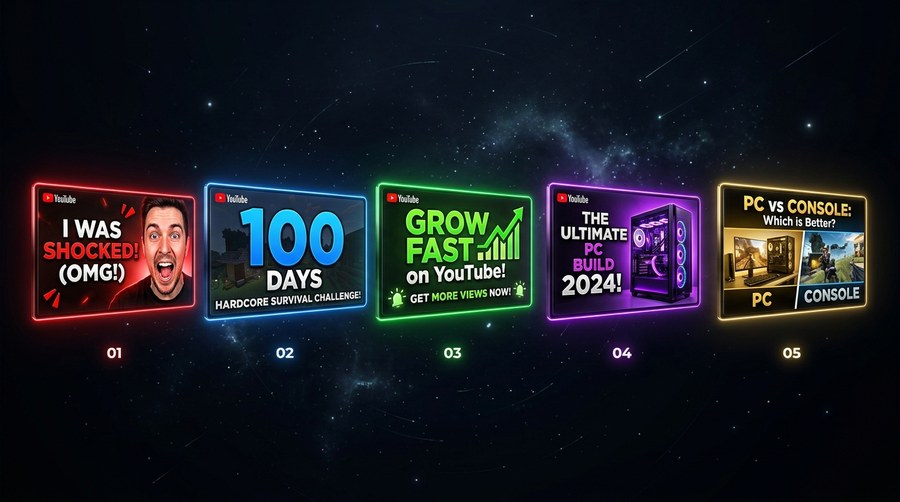
The most successful YouTube thumbnails are not random acts of creativity. Behind the variety of styles, colors, and subjects, most high-CTR thumbnails follow one of five repeatable patterns. Understanding these archetypes gives you a framework to design from, not a formula to copy blindly, but a set of proven psychological triggers you can adapt to any niche or topic.
Why Archetypes Work
Archetypes work because they tap into predictable viewer psychology. Each pattern creates a specific type of curiosity, expectation, or emotional response. When a viewer recognizes the pattern, consciously or not, their brain already knows what kind of content to expect, reducing the perceived risk of clicking.
The 5 High-Performing Thumbnail Archetypes
Archetype 1, The Reaction
A face with a strong emotional expression, shock, disbelief, excitement, reacting to something implied but not fully shown. The expression creates the "what caused this?" question that drives the click. Works in virtually every niche. Best expressions: wide eyes, open mouth, hand-to-face gestures. The key is that the reaction implies an off-screen event the viewer needs to see. Used by MrBeast, MKBHD, and nearly every challenge and commentary channel at scale.
Archetype 2, The Before/After
A split-screen or contrasting visual showing a transformation, financial, physical, skill-based, or aesthetic. The tension between the two states creates immediate curiosity about the process. Works exceptionally well in fitness, finance, DIY, and productivity content. The "after" should always be aspirational or dramatically different. Even a single image implying transformation (a graph trending up, a before photo with an arrow) activates this pattern.
Archetype 3, The Number List
A large, prominent number (5, 10, 7, 3) dominating the thumbnail. Numbers imply completeness, structure, and value, the viewer knows they are getting a defined set of insights. The number should be large enough to read at mobile size. Works best when the number itself implies scale ("50 Tools") or precision ("The 1 Mistake"). Most effective in educational, tutorial, and "life hack" content. The number does the heavy lifting so the rest of the thumbnail can be visual.
Archetype 4, The Bold Claim
2–4 words of large text making a statement that is either surprisingly strong ("I Was Wrong"), counterintuitive ("Stop Doing This"), or curiosity-inducing ("This Changes Everything"). The text IS the thumbnail, the visual supports the text rather than competing with it. Works best for opinion, commentary, and news content. The bold claim archetype requires the title to provide context, thumbnail and title work as a pair, with the thumbnail making the provocative statement and the title explaining what it's about.
Archetype 5, The Mystery Object
A visually striking object, result, or image that raises an immediate "what is that?" question without providing enough context to answer it. Often paired with minimal or no text. The visual itself carries the curiosity. Works exceptionally well when the object is unusual, the result is unexpected, or the context is deliberately withheld. Common in science, food, gaming, and review content. The risk of this archetype is that it can feel like clickbait if the video doesn't deliver on the visual promise.
Mixing Archetypes
The highest-performing thumbnails often combine two archetypes. A Reaction + Bold Claim (face with short text) is the most common combination in top-performing videos across almost every niche. A Before/After + Number (split image with "In 30 Days" text) works well for transformation content. The key is that the two archetypes should reinforce the same message, not compete for attention.
How to Choose the Right Archetype for Your Video
Start with the emotion you want the viewer to feel when they click. Curiosity → Mystery Object. Aspiration → Before/After. Authority → Number List. Urgency → Bold Claim. Connection → Reaction. Then look at what the top 5 performing videos in your niche use. If most use the Reaction archetype, you have two choices: use it too (joining an established pattern) or use a different archetype to stand out visually (pattern interruption). Both strategies work; the right choice depends on where your channel is in its growth stage.
Study the Archetypes in Your Niche
Download thumbnails from top-performing competitors and identify which archetypes they rely on, free with Thumbnail Swiper.
Have a question, suggestion, or found a bug? Send us an email and we'll get back to you as soon as possible.
jaythecreator.info@gmail.com
Click Copy or highlight to select
About Us
Thumbnail Swiper, Built for YouTube Creators
Thumbnail Swiper is a free, no-login toolkit built for YouTube creators who take their thumbnails seriously. Everything runs in your browser, fast, private, and always free.
What We Built
We noticed that the tools creators actually needed, downloading thumbnails, previewing how they look on YouTube, split-testing ideas, and reverse-engineering competitor designs, were either paywalled, or just didn't exist. So we built them all in one clean, fast, free tool.
What You Can Do Here
Download any YouTube thumbnail, in every available resolution, instantly
Preview your thumbnail on a realistic YouTube home feed mockup
Split test up to three thumbnails side by side before you publish
Recreate a competitor's thumbnail using an AI prompt you can paste into any image generator
Our Philosophy
No account required. No watermarks. No limits on downloads. We believe creator tools should be accessible to everyone, whether you have 100 subscribers or 10 million.
Privacy First
We may collect limited data to improve your experience. We are committed to handling any such data responsibly and will always be transparent about what we collect and why. See our Privacy Policy for full details.
Contact
Have a suggestion, found a bug, or want to collaborate? Use the Contact link in the footer. We read everything.
Privacy Policy
Effective date: June 2026
The short version: Thumbnail Swiper does not directly collect personal information through the tool. Third-party services like Google AdSense may use cookies for ad personalization. See Section 4 for details on how to opt out.
1. Who We Are
Thumbnail Swiper is a free online tool that allows users to download YouTube video thumbnails and access related creator utilities. This policy explains our approach to your privacy.
2. Information We Currently Collect
As of the effective date of this policy, Thumbnail Swiper does not directly collect personal information through the tool itself. However, third-party services we use (such as Google AdSense) may collect certain data automatically. We do not currently collect or store:
Your name, email address, or any personal identifiers
YouTube URLs you paste into the tool
Images you upload for the preview or split-test features
Your IP address or location data directly
Browser fingerprints or device information directly
This may change in the future. If we begin collecting additional data, this policy will be updated accordingly.
3. How the Tool Works
Core functionality, thumbnail fetching, image preview, split testing, and prompt copying, is designed to run in your browser. When you paste a YouTube URL, your browser retrieves the thumbnail directly from YouTube's public servers (i.ytimg.com). We do not intentionally store or log the content of your searches. Third-party services embedded in the site (such as advertising networks) may operate independently and are subject to their own privacy policies.
4. Third-Party Services & Advertising
Thumbnail images are fetched from YouTube's public CDN (ytimg.com), which is operated by Google. Your use of YouTube content is subject to Google's Privacy Policy. We have no control over and no visibility into those requests.
Google AdSense: Thumbnail Swiper may use Google AdSense to display advertisements. Google AdSense is a third-party advertising service operated by Google LLC. Google and its partners may use cookies and similar tracking technologies to serve ads based on your prior visits to this site or other sites on the internet. These cookies allow Google and its partners to serve ads to you based on your visit to Thumbnail Swiper and/or other sites on the internet.
You may opt out of personalized advertising by visiting Google's Ads Settings, or by visiting aboutads.info to opt out of a third-party vendor's use of cookies for personalized advertising.
Thumbnail Swiper is not directed at children under 13. We do not knowingly collect any information from children.
6. Changes to This Policy
If this policy changes materially, we will update the effective date above. Continued use of Thumbnail Swiper after any changes constitutes acceptance of the updated policy.
7. Contact
Questions about this privacy policy? Since we collect no user data, there is no account system or data request process. For general inquiries, use the Contact link in the footer of this site.
Terms & Conditions
Effective date: June 2026
The short version: Thumbnail Swiper is a free tool for personal and research use. Use it responsibly. We provide it as-is with no guarantees. Don't use it to infringe copyright or violate YouTube's terms.
1. Acceptance of Terms
By accessing or using Thumbnail Swiper ("the Site," "the Tool"), you agree to be bound by these Terms and Conditions. If you do not agree, please do not use the Site. We reserve the right to update these terms at any time, continued use of the Site after changes constitutes acceptance.
2. What Thumbnail Swiper Does
Thumbnail Swiper is a browser-based utility that retrieves publicly available thumbnail images from YouTube's content delivery network (ytimg.com). It also provides creator tools including a YouTube feed preview mockup, a thumbnail split-test viewer, and an AI prompt generator for thumbnail recreation. All processing occurs client-side in your browser.
3. Permitted Use
You may use Thumbnail Swiper for:
Personal research and educational purposes
Downloading thumbnails of videos you own or have rights to
Analyzing thumbnail design and composition for creative inspiration
Preview and testing of your own thumbnail content
4. Prohibited Use
You agree not to use Thumbnail Swiper to:
Download, reproduce, or distribute copyrighted thumbnail images without the permission of the rights holder
Scrape, automate, or bulk-download thumbnails in a manner that violates YouTube's Terms of Service
Use downloaded content for commercial purposes without appropriate rights or licenses
Misrepresent another creator's content as your own
Attempt to reverse-engineer, disrupt, or interfere with the Site
Use the Site for any unlawful purpose
5. Intellectual Property
YouTube thumbnails retrieved through Thumbnail Swiper are the intellectual property of their respective creators and/or YouTube (Google LLC). Thumbnail Swiper does not claim ownership over any thumbnail content retrieved through the tool. Downloading a thumbnail does not transfer any rights to that content. You are solely responsible for ensuring your use of any downloaded content complies with applicable copyright law and YouTube's Terms of Service.
6. Disclaimer of Warranties
Thumbnail Swiper is provided "as is" and "as available" without warranties of any kind, express or implied. We do not guarantee that:
The Site will be available at all times or free of errors
Thumbnails will always be retrievable (YouTube may change its CDN structure at any time)
The tool will meet your specific requirements
7. Limitation of Liability
To the fullest extent permitted by law, Thumbnail Swiper and its operators shall not be liable for any direct, indirect, incidental, consequential, or punitive damages arising from your use of the Site or any content downloaded through it. This includes, but is not limited to, copyright disputes, loss of data, or business interruption.
8. Third-Party Services
Thumbnail Swiper retrieves thumbnail images from YouTube's public CDN. We are not affiliated with, endorsed by, or in any way officially connected to YouTube, Google LLC, or any of their subsidiaries. "YouTube" is a trademark of Google LLC. Your use of YouTube content is governed by YouTube's Terms of Service.
9. Changes to the Service
We reserve the right to modify, suspend, or discontinue Thumbnail Swiper at any time without notice. We shall not be liable to you or any third party for any such modification, suspension, or discontinuation.
10. Governing Law
These Terms shall be governed by and construed in accordance with applicable law. Any disputes arising from your use of Thumbnail Swiper shall be resolved through good-faith negotiation before pursuing any formal legal remedy.
11. Contact
For questions regarding these Terms and Conditions, please use the Contact link in the footer of this site.

 ThumbnailSwiper